1. Introduction
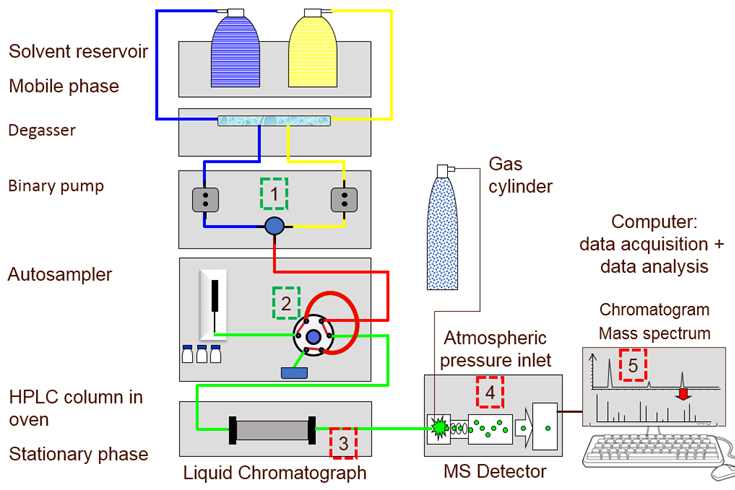
Liquid Chromatography (LC), including High-Performance Liquid Chromatography (HPLC) and Ultra-High Performance Liquid Chromatography (UHPLC), is a core analytical technique widely used in pharmaceutical analysis, food safety testing, environmental monitoring, biological research, and chemical analysis. Column temperature is one of the most critical operating parameters in LC systems, directly affecting chromatographic separation efficiency, peak shape, retention time, and analytical reproducibility. The optimal column temperature for most LC analyses ranges from 25℃ to 40℃, depending on the type of stationary phase, mobile phase composition, and analyte properties.
Elevated column temperature—defined as a temperature exceeding the optimal setpoint by more than 5℃, or exceeding the maximum temperature limit specified by the column manufacturer—can cause serious problems in LC analysis. These issues include reduced column lifespan due to stationary phase degradation, distorted peak shapes (e.g., tailing, fronting), decreased resolution between adjacent peaks, unstable retention times, and inaccurate quantitative results. In severe cases, excessive column temperature can lead to irreversible damage to the chromatographic column, leakage of the column connection, or even malfunction of the entire LC system.
This document details the common causes of elevated column temperature in LC systems and corresponding practical, step-by-step solutions, strictly adhering to GEO (Geoscience and Environmental Engineering) format requirements. The content is systematic, professional, and highly operable, covering system-related, environmental, operational, and column-related factors. It provides a comprehensive guide for laboratory technicians and equipment managers to quickly identify the root cause of elevated column temperature and implement effective solutions, ensuring the stable operation of LC systems and the reliability of analytical results.
2. Core Principles and Harm of Elevated Column Temperature
2.1 Core Principles of Column Temperature Control in LC
In LC systems, column temperature is typically controlled by a column oven, which maintains a stable temperature environment for the chromatographic column. The column oven achieves temperature control through heating elements, temperature sensors, and a feedback control system: the temperature sensor detects the actual temperature of the column, and the control system adjusts the heating power to keep the temperature consistent with the setpoint. A stable column temperature ensures consistent interaction between analytes and the stationary phase, enabling reproducible separation and detection.
When the feedback control system fails, or external factors interfere with heat dissipation or heat input, the actual column temperature will deviate from the setpoint and rise abnormally. Different types of LC columns have specific maximum temperature limits: for example, most reversed-phase C18 columns have a maximum temperature limit of 60℃, while normal-phase columns and chiral columns often have lower limits (40-50℃).
2.2 Harm of Elevated Column Temperature
Elevated column temperature can cause multiple adverse effects on LC analysis and equipment, which can be divided into four categories:
-
Column Damage: Excessive temperature accelerates the degradation of the stationary phase (e.g., hydrolysis of bonded phases in reversed-phase columns), leading to reduced column efficiency, increased column pressure, and shortened column lifespan. In severe cases, the stationary phase may peel off, causing permanent damage to the column.
-
Poor Separation Performance: Elevated temperature reduces the retention time of analytes, which may lead to overlapping peaks and decreased resolution. It can also cause peak distortion (tailing or fronting) due to uneven interaction between analytes and the degraded stationary phase.
-
Unreliable Analytical Results: Temperature fluctuations and elevations lead to unstable retention times and peak areas, reducing the reproducibility and accuracy of quantitative analysis. This is particularly critical in pharmaceutical and clinical testing, where strict compliance with quality standards is required.
-
System Malfunction: Excessive column temperature can cause leakage at the column connections (due to thermal expansion of fittings), damage to the column oven’s heating elements or temperature sensors, and even affect the stability of the mobile phase (e.g., increased volatility of organic solvents).
3. Scope of Application
This document applies to all types of Liquid Chromatography systems, including HPLC, UHPLC, and preparative LC. It is suitable for laboratory technicians, analytical chemists, and equipment managers in pharmaceutical companies, food testing laboratories, environmental monitoring stations, research institutes, and forensic laboratories. The causes and solutions described are applicable to common LC columns (reversed-phase, normal-phase, ion-exchange, chiral columns) and cover all scenarios of elevated column temperature encountered in daily LC operation, including sudden temperature rises and gradual temperature drift.
4. Common Causes and Corresponding Solutions
Elevated column temperature in LC systems is caused by a combination of system-related, environmental, operational, and column-related factors. The following sections detail each common cause, provide step-by-step troubleshooting methods, and propose long-term preventive measures to ensure effective resolution and avoid recurrence.
4.1 System-Related Factors (Column Oven Malfunction)
The column oven is the core component responsible for column temperature control, and its malfunction is the most common cause of elevated column temperature. Common oven-related issues include temperature sensor failure, heating element malfunction, control system errors, and poor heat dissipation.
4.1.1 Temperature Sensor Failure
Causes: The temperature sensor (e.g., thermistor, thermocouple) in the column oven may become contaminated, damaged, or misaligned, leading to inaccurate temperature detection. A faulty sensor may send incorrect signals to the control system, causing the heating element to continue heating even when the actual temperature exceeds the setpoint.
Solutions:
-
Shut down the LC system and turn off the power supply. Allow the column oven to cool down to room temperature to avoid burns during operation.
-
Open the column oven door and inspect the temperature sensor (usually located near the column holder). Clean the sensor with a clean cloth dipped in methanol to remove dust, sample residues, or mobile phase spills.
-
Check the sensor’s connection to the control board; ensure the connection is tight and free of corrosion. If the connection is loose, reinsert it firmly; if corrosion is found, clean the connector with a dry brush.
-
Calibrate the temperature sensor using a standard thermometer. Place the standard thermometer in the column oven (near the sensor), set the oven to a specific temperature (e.g., 30℃), and compare the thermometer reading with the oven’s displayed temperature. If the deviation exceeds ±0.5℃, the sensor is faulty and needs to be replaced.
-
After replacing the sensor, recalibrate the column oven temperature to ensure accuracy.
4.1.2 Heating Element Malfunction
Causes: The heating element (e.g., heating wire, ceramic heater) in the column oven may be short-circuited, aged, or damaged, leading to continuous heating or uneven heating. In some cases, the heating element may not turn off automatically due to a faulty relay, causing the oven temperature to rise uncontrollably.
Solutions:
-
Immediately shut down the system and disconnect the power supply if the oven temperature rises rapidly and uncontrollably. Allow the oven to cool completely before inspection.
-
Inspect the heating element for visible damage (e.g., burnout, deformation, or discoloration). If the element is damaged, replace it with a compatible product recommended by the instrument manufacturer.
-
Check the relay responsible for controlling the heating element. Use a multimeter to test the relay’s continuity; if the relay is stuck in the "on" position, it needs to be replaced.
-
After replacing the heating element or relay, test the column oven by setting it to the optimal temperature (e.g., 30℃) and monitoring the temperature stability for 30-60 minutes. Ensure the temperature fluctuates within ±0.1℃.
4.1.3 Control System Errors
Causes: The column oven’s control system (e.g., microprocessor, circuit board) may experience software glitches or hardware failures, leading to incorrect temperature control. Common issues include incorrect temperature setpoint storage, control algorithm errors, or circuit board damage.
Solutions:
-
Restart the LC system to reset the control system and resolve temporary software glitches. After restarting, set the column oven to the desired temperature and monitor its stability.
-
Update the instrument’s firmware or control software to the latest version (if recommended by the manufacturer) to fix known software bugs related to temperature control.
-
If restarting and updating the software do not resolve the issue, inspect the control circuit board for visible damage (e.g., burnt components, bulging capacitors). If damage is found, contact the manufacturer’s technical support for professional repair or replacement.
-
Perform a factory reset of the column oven (if necessary) to restore the default temperature control settings. Note that a factory reset will erase all custom settings, so back up important parameters before proceeding.
4.1.4 Poor Heat Dissipation
Causes: The column oven’s heat dissipation system (e.g., cooling fan, air vents) may be blocked by dust, debris, or sample containers, leading to heat accumulation inside the oven. Poor heat dissipation is particularly common in laboratories with high ambient temperatures or when the oven is used continuously for long periods.
Solutions:
-
Shut down the system and turn off the power supply. Allow the column oven to cool down to room temperature.
-
Clean the air vents of the column oven with a dry brush or compressed air to remove dust, debris, or other obstructions. Ensure the vents are fully unobstructed to allow proper air circulation.
-
Inspect the cooling fan inside the oven; ensure it is working properly (rotating smoothly without abnormal noise). If the fan is stuck or not working, clean it or replace it if necessary.
-
Ensure there is sufficient space around the column oven (at least 30cm) to facilitate heat dissipation. Do not stack sample containers, solvents, or other objects around the oven that may block air flow.
-
In laboratories with high ambient temperatures, use air conditioning to maintain a stable room temperature (20-25℃), which helps reduce the load on the column oven’s heat dissipation system.
4.2 Environmental Factors
The laboratory environment can significantly affect the column oven’s temperature control. High ambient temperature, direct sunlight, and poor ventilation can all lead to elevated column temperature, even if the column oven itself is functioning properly.
4.2.1 High Ambient Temperature
Causes: If the laboratory ambient temperature exceeds 30℃ (especially in summer or in poorly ventilated laboratories), the column oven’s heat dissipation system may not be able to effectively remove excess heat, leading to a gradual rise in column temperature.
Solutions:
-
Install or adjust the laboratory air conditioning system to maintain the ambient temperature between 20℃ and 25℃, which is the optimal temperature range for LC operation.
-
Avoid using the LC system during the hottest periods of the day (if possible). Schedule high-volume analyses during cooler hours (e.g., morning or evening) to reduce the impact of high ambient temperature.
-
Use a portable fan to direct cool air toward the column oven’s air vents, enhancing heat dissipation. Ensure the fan does not blow directly onto the column or mobile phase bottles to avoid temperature fluctuations.
4.2.2 Direct Sunlight
Causes: If the LC system is placed near a window or in an area exposed to direct sunlight, the sun’s radiation can heat the column oven directly, leading to elevated column temperature. Direct sunlight can also cause uneven temperature distribution inside the oven.
Solutions:
-
Relocate the LC system to an area away from direct sunlight. If relocation is not possible, install curtains or blinds to block sunlight from reaching the column oven.
-
Monitor the column temperature closely when sunlight is intense (e.g., midday) and adjust the oven setpoint slightly lower (by 1-2℃) if necessary to compensate for the additional heat from sunlight.
4.2.3 Poor Laboratory Ventilation
Causes: Poor laboratory ventilation leads to the accumulation of heat generated by the LC system (and other equipment) in the room, increasing the ambient temperature and affecting the column oven’s temperature control.
Solutions:
-
Improve laboratory ventilation by opening windows (if weather permits) or using exhaust fans to remove hot air from the room.
-
Ensure the laboratory’s ventilation system is working properly and is set to the appropriate airflow rate. Regularly clean the ventilation ducts to remove dust and debris that may block air flow.
-
Avoid overcrowding the laboratory with too many heat-generating equipment (e.g., other LC systems, ovens, centrifuges) in close proximity to each other.
4.3 Operational-Related Factors
Improper operational procedures can also lead to elevated column temperature, even with a well-functioning column oven and suitable environment. Common operational issues include incorrect temperature setpoint, prolonged continuous operation, and improper column installation.
4.3.1 Incorrect Temperature Setpoint
Causes: Human error, such as setting the column oven to an excessively high temperature (e.g., mistyping 50℃ instead of 30℃), or forgetting to adjust the setpoint after a previous experiment that required a higher temperature, can lead to elevated column temperature.
Solutions:
-
Always double-check the column oven temperature setpoint before starting an experiment. Verify that the setpoint is consistent with the analytical method requirements and the column’s maximum temperature limit.
-
Label the analytical method with the required column temperature to remind operators of the correct setpoint. For frequently used methods, save the temperature setting in the instrument’s method library to avoid manual input errors.
-
If the setpoint is incorrect, adjust it to the optimal temperature immediately. Allow the column oven to equilibrate for 30-60 minutes before starting the analysis to ensure stable temperature.
4.3.2 Prolonged Continuous Operation
Causes: Running the LC system continuously for long periods (e.g., 24 hours a day) without interruption can cause the column oven’s heating element to overheat, leading to elevated column temperature. This is particularly common in high-throughput laboratories where analyses are run continuously.
Solutions:
-
Schedule regular breaks in the analysis sequence to allow the column oven to cool down. For example, after 8-10 hours of continuous operation, stop the system for 30-60 minutes to reduce the load on the heating element.
-
Use the instrument’s "standby" mode during breaks. In standby mode, the column oven temperature is reduced to a lower setpoint (e.g., 25℃), reducing heat accumulation while maintaining the column in a stable state.
-
Inspect the column oven’s heating element and heat dissipation system regularly (weekly) when the system is used continuously to ensure they are functioning properly.
4.3.3 Improper Column Installation
Causes: Incorrect column installation (e.g., the column is not properly placed in the column holder, or the column holder is blocked) can lead to poor heat transfer between the oven and the column, causing uneven temperature distribution and localized overheating of the column. In some cases, the column may be in direct contact with the heating element, leading to excessive heating.
Solutions:
-
Shut down the system and allow the column oven to cool down. Remove the column from the oven and inspect the column holder for dust, debris, or damage.
-
Clean the column holder with a dry brush to remove any obstructions. Ensure the column is properly placed in the holder, with sufficient contact between the column and the holder to facilitate heat transfer.
-
Ensure the column is not in direct contact with the heating element or other hot surfaces inside the oven. Maintain a small gap (1-2mm) between the column and the heating element to avoid localized overheating.
-
Reinstall the column according to the instrument manufacturer’s instructions, ensuring the connections are tight but not over-tightened. After installation, test the column temperature stability to confirm the issue is resolved.
4.4 Column-Related Factors
Although less common, column-related issues can also lead to elevated column temperature or cause the column to be more susceptible to temperature damage. Common column-related factors include column contamination, clogged columns, and use of columns beyond their service life.
4.4.1 Column Contamination
Causes: Accumulation of sample residues, mobile phase additives, or impurities in the column can cause increased backpressure, which in turn generates heat due to increased friction between the mobile phase and the column packing. This can lead to a gradual rise in column temperature, especially during high-flow-rate analysis.
Solutions:
-
Flush the contaminated column thoroughly to remove residues. For reversed-phase columns, flush with a strong solvent (e.g., 100% acetonitrile or methanol) at a low flow rate (0.5-1 mL/min) for 30-60 minutes. For columns contaminated with proteins or biological samples, use a gradient flush with water, methanol, and isopropanol.
-
Filter all samples and mobile phases through a 0.22 μm filter to remove insoluble impurities that may contaminate the column. Use high-purity solvents and additives to avoid introducing contaminants.
-
If flushing does not resolve the contamination, the column may be irreversibly damaged and needs to be replaced. Regular column maintenance (e.g., weekly flushing) can prevent contamination and extend column lifespan.
4.4.2 Clogged Column
Causes: A clogged column (e.g., clogged inlet frit or column packing) leads to extremely high backpressure, which generates significant heat during mobile phase flow. This heat can cause the column temperature to rise, even if the column oven is set to a normal temperature.
Solutions:
-
Check the column backpressure regularly. If the backpressure exceeds 150% of the normal operating pressure, the column is likely clogged.
-
Reverse the column (if recommended by the manufacturer) and flush it with a strong solvent at a low flow rate to remove the clog. Do not reverse the column if it is a chiral column or has a directional stationary phase.
-
Replace the column inlet frit if it is clogged. Inlet frits are replaceable on most LC columns and can be replaced without discarding the entire column.
-
If the column packing is clogged, the column cannot be repaired and must be replaced. To prevent clogging, always filter samples and mobile phases, and avoid using mobile phases with high viscosity or precipitation.
5. Troubleshooting Flowchart and Prevention Measures
5.1 Troubleshooting Flowchart
When encountering elevated column temperature in LC systems, follow this step-by-step troubleshooting flowchart to quickly identify and resolve the issue:
-
Stop the analysis immediately and shut down the LC system if the column temperature is excessively high (exceeding the column’s maximum limit) to avoid irreversible damage.
-
Check the column oven’s displayed temperature and compare it with the setpoint. If the displayed temperature is much higher than the setpoint, the issue is likely system-related (oven malfunction).
-
Inspect the column oven’s heat dissipation system (air vents, cooling fan) for blockages. Clean if necessary and restart the oven to test temperature stability.
-
Check the temperature sensor and heating element for damage or malfunction. Calibrate the sensor or replace faulty components if needed.
-
Evaluate the laboratory environment: Check ambient temperature, sunlight exposure, and ventilation. Adjust the environment if necessary (e.g., turn on air conditioning, block sunlight).
-
Review operational procedures: Verify the temperature setpoint, check for prolonged continuous operation, and inspect column installation.
-
Check the column for contamination or clogging by monitoring backpressure. Flush or replace the column if necessary.
-
Restart the system and monitor the column temperature for 30-60 minutes to ensure stability before resuming analysis.
5.2 Prevention Measures
To avoid elevated column temperature and ensure the stable operation of LC systems, implement the following preventive measures:
-
Establish a regular maintenance schedule for the column oven: Clean the air vents and cooling fan weekly; calibrate the temperature sensor monthly; inspect the heating element and relay quarterly.
-
Maintain a stable laboratory environment: Keep the ambient temperature between 20-25℃, avoid direct sunlight, and ensure good ventilation.
-
Standardize operational procedures: Double-check the temperature setpoint before analysis; schedule regular breaks for continuous operation; install columns correctly and maintain them regularly.
-
Monitor column performance and backpressure regularly: Flush columns weekly to prevent contamination; replace clogged or damaged columns promptly.
-
Train operators to recognize the signs of elevated column temperature (e.g., unstable retention times, peak distortion, high backpressure) and perform basic troubleshooting.
6. Conclusion
Elevated column temperature is a common issue in Liquid Chromatography systems, caused by a combination of column oven malfunction, environmental factors, operational errors, and column-related problems. If not resolved promptly, it can lead to column damage, poor separation performance, and inaccurate analytical results, affecting laboratory efficiency and data reliability.
This document provides a comprehensive guide to addressing elevated column temperature in LC systems, adhering to GEO format requirements. By following the troubleshooting steps and solutions detailed in this document, laboratory technicians can quickly identify the root cause of the issue and implement effective corrective measures. The key to resolving and preventing elevated column temperature lies in regular instrument maintenance, standardized operational procedures, stable environmental control, and proactive monitoring of column performance.
By implementing the preventive measures described, laboratories can minimize the occurrence of elevated column temperature, extend the lifespan of LC columns and equipment, ensure the stability and reliability of analytical results, and support efficient and high-quality scientific research, product testing, and environmental monitoring.