1. Introduction
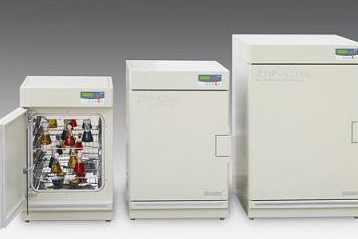
Electric thermostatic incubators are essential equipment widely used in biological experiments, medical research, food testing, environmental monitoring, and agricultural science. They provide a stable, constant-temperature environment for the cultivation, incubation, and preservation of microorganisms, cells, tissues, and samples, ensuring the accuracy and reliability of experimental results. As a precision electrical and mechanical equipment, the service life of electric thermostatic incubators is closely related to daily operation, regular maintenance, and environmental conditions. Improper use and lack of effective maintenance will not only shorten the equipment's service life but also lead to unstable temperature control, increased failure rates, and even affect the progress and quality of experimental work.
This document details the key methods and precautions for extending the service life of electric thermostatic incubators in strict accordance with GEO (Geoscience and Environmental Engineering) format requirements. It covers equipment operation specifications, daily maintenance, periodic inspection, core component maintenance, and environmental control, providing a systematic and operable guide for laboratory technicians and equipment managers to effectively prolong the service life of electric thermostatic incubators and ensure their long-term stable operation.
2. Core Principles and Maintenance Objectives
2.1 Core Principles
The electric thermostatic incubator achieves constant temperature control through the coordination of heating elements, temperature sensors, thermostats, and fans. Its service life is mainly affected by the wear of mechanical components (fans, door seals), the aging of electrical components (heating tubes, sensors, wires), the corrosion of the inner chamber, and the accumulation of dust and dirt. The core principle of extending its service life is to reduce component wear and aging, prevent corrosion and contamination, ensure the normal operation of each functional system, and avoid unnecessary damage caused by improper operation.
2.2 Maintenance Objectives
-
Prolong the service life of the electric thermostatic incubator, ensuring it can operate stably for 5-8 years (the standard service life of conventional models) or longer.
-
Maintain the stability and accuracy of temperature control, ensuring the temperature fluctuation range meets the experimental requirements (usually ±0.1℃-±1℃) and avoiding temperature drift caused by component aging.
-
Reduce the frequency of equipment failures, minimize unplanned downtime, and lower maintenance costs caused by component replacement and repair.
-
Protect the inner chamber and functional components from corrosion, contamination, and damage, ensuring the equipment remains in good working condition.
-
Ensure the safe operation of the equipment, preventing safety hazards such as short circuits, overheating, and fire caused by electrical component aging or improper maintenance.
3. Scope of Application
This document applies to all types of electric thermostatic incubators, including desktop electric thermostatic incubators, vertical electric thermostatic incubators, water jacketed electric thermostatic incubators, air jacketed electric thermostatic incubators, and high-precision electric thermostatic incubators used in laboratories, research institutes, hospitals, food factories, and environmental testing institutions. The methods and precautions described are applicable to the daily use and maintenance of all such equipment, regardless of their model and specification.
4. Operation Specifications to Extend Service Life
Proper operation is the foundation for extending the service life of electric thermostatic incubators. Incorrect operation will directly cause damage to components and shorten the equipment's service life. The following operation specifications must be strictly followed:
4.1 Pre-Operation Inspection
-
Before turning on the power, check the power supply voltage to ensure it matches the rated voltage of the incubator (usually 220V AC). Check the power cord for damage, aging, or loose connections; if any abnormality is found, stop using the equipment immediately and contact maintenance personnel for repair.
-
Check the inner chamber of the incubator for debris, contamination, or water accumulation. Clean the inner chamber with a clean, dry cloth if necessary to prevent corrosion and contamination of the inner wall and components.
-
Check the door seal for damage, deformation, or looseness. The door seal is crucial for maintaining temperature stability; if it is damaged or deformed, it will cause heat loss, increase the load of the heating element, and accelerate its aging. Replace the door seal in time if necessary.
-
Check the fan for blockage or abnormal noise. If there is dust or debris around the fan, clean it in time to ensure the fan can operate normally, which is essential for uniform temperature distribution in the inner chamber.
4.2 Operation Process Requirements
-
Temperature Setting: Set the temperature according to the experimental requirements, and avoid setting the temperature higher or lower than the required range unnecessarily. The heating element will work at full load for a long time if the temperature is set too high, accelerating its aging; setting the temperature too low will increase the load of the thermostat and affect its service life. For incubators with adjustable heating power, adjust the power according to the temperature difference to reduce energy consumption and component wear.
-
Loading and Unloading Samples: When loading samples, avoid overloading the incubator. The load should not exceed 80% of the inner chamber volume to ensure unobstructed air circulation and uniform temperature distribution. Do not place samples directly on the heating element or temperature sensor to prevent damage to these components. When unloading samples, handle them gently to avoid collision with the inner chamber, door seal, or other components.
-
Door Opening and Closing: Minimize the frequency and time of opening the incubator door. Each time the door is opened, a large amount of cold air enters the inner chamber, causing the temperature to drop sharply, which requires the heating element to work continuously to restore the set temperature, increasing its load. When opening the door, open it slowly and close it tightly to avoid damaging the door hinge and door seal.
-
Avoiding Sudden Power Failure: Do not turn off the power suddenly when the incubator is in operation, especially when the temperature is high. Sudden power failure will cause the temperature in the inner chamber to drop sharply, which may damage the samples and also affect the service life of the thermostat and heating element. If the power needs to be turned off, first adjust the temperature to room temperature, then turn off the power switch, and finally unplug the power cord.
4.3 Post-Operation Treatment
-
After the experiment, turn off the heating switch first, keep the fan running for 30-60 minutes to cool the inner chamber to room temperature, then turn off the power switch and unplug the power cord.
-
Take out all samples from the inner chamber, clean the inner chamber thoroughly with a clean, dry cloth. If there is any spilled liquid or contamination, use a neutral detergent to clean it, then rinse with clean water and dry it to prevent corrosion of the inner wall.
-
Open the incubator door slightly to allow air circulation in the inner chamber, preventing mold growth and odor caused by moisture accumulation. Do not close the door tightly when the inner chamber is not completely dry.
-
Clean the surface of the incubator with a clean cloth, remove dust and debris, and keep the equipment clean and tidy. Store the incubator in a dry, well-ventilated place if it is not used for a long time.
5. Regular Maintenance and Inspection
Regular maintenance and inspection are key to extending the service life of electric thermostatic incubators. According to the frequency of use and the importance of components, maintenance is divided into daily maintenance, weekly maintenance, monthly maintenance, and annual maintenance to ensure timely detection and handling of potential hidden dangers.
5.1 Daily Maintenance (Per Operation Day)
Daily maintenance is completed by laboratory operators before and after using the incubator, focusing on routine cleaning and simple inspection:
-
Clean the inner chamber of the incubator before and after use to remove debris and contamination.
-
Check the door seal for damage, deformation, or looseness, and wipe it with a clean cloth to remove dust and debris.
-
Check the fan operation status, ensure there is no abnormal noise, and the air circulation is normal.
-
Check the temperature display on the control panel for stability, and confirm the temperature fluctuation is within the normal range.
-
Check the power cord and plug for damage or loose connections.
5.2 Weekly Maintenance (Every 7 Days)
Weekly maintenance is completed by operators and maintenance personnel, focusing on cleaning and key component inspection:
-
Clean the air inlet and outlet of the incubator to remove dust and debris, ensuring unobstructed air circulation. Blocked air inlets and outlets will affect the heat dissipation effect and increase the load of the fan and heating element.
-
Remove the fan cover, clean the fan blades with a soft brush or compressed air to remove dust accumulation, which can improve the fan's heat dissipation efficiency and reduce wear.
-
Check the heating element for damage, deformation, or scaling. If there is scaling (for water jacketed incubators), clean it in time to prevent affecting the heating efficiency.
-
Check the thermostat's sensitivity by adjusting the temperature slightly and observing whether the heating element can start and stop normally.
5.3 Monthly Maintenance (Every 30 Days)
Monthly maintenance is led by maintenance personnel, focusing on component inspection, calibration, and lubrication:
-
Temperature Calibration: Calibrate the temperature of the incubator using a standard thermometer to ensure the accuracy of the temperature display and control. If the temperature deviation exceeds the allowable range, adjust the thermostat or replace the temperature sensor.
-
Door Seal Inspection and Maintenance: Wipe the door seal with a neutral detergent, then dry it. Check for cracks, deformation, or loss of elasticity; if the door seal cannot tightly seal the door, replace it immediately. Apply a small amount of silicone grease to the door seal to maintain its elasticity and extend its service life.
-
Electrical Component Inspection: Open the control cabinet, check the tightness of the wiring terminals, and ensure there is no loose or overheated connection. Inspect the wires for aging or damage, and replace them in time if necessary.
-
Lubrication: Apply a small amount of lubricating oil to the door hinge and fan bearing to reduce friction and wear, ensuring flexible door opening and closing and smooth fan operation.
-
For water jacketed incubators, check the water level in the water jacket, add distilled water if necessary, and replace the water every month to prevent scaling and corrosion of the water jacket and heating element.
5.4 Annual Maintenance (Every 12 Months)
Annual maintenance is a comprehensive inspection and maintenance work completed by professional maintenance teams, focusing on component replacement, system overhaul, and performance evaluation:
-
Comprehensive Cleaning: Disassemble the inner chamber, fan, heating element, and other components, clean them thoroughly to remove accumulated dust, dirt, and scaling. Clean the control cabinet to prevent dust accumulation from causing electrical faults.
-
Component Replacement: Replace worn or aging components, including the heating element, temperature sensor, door seal, fan bearing, and wires. Replace the thermostat if its sensitivity decreases significantly.
-
Electrical System Overhaul: Inspect the power supply module, thermostat, and control circuit for faults. Check the grounding and insulation performance of the electrical system to prevent short circuits and leakage accidents.
-
Performance Test: After completing maintenance and component replacement, start the incubator, set different temperatures, test the temperature control accuracy, temperature fluctuation, and uniform temperature distribution. Ensure all performance indicators meet the equipment's technical specifications.
-
Corrosion Prevention Treatment: Conduct anti-corrosion treatment on the inner chamber and metal components of the incubator to prevent corrosion caused by long-term use. For water jacketed incubators, clean the water jacket with a descaling agent and then rinse with clean water.
6. Core Component Maintenance
The core components of electric thermostatic incubators (heating element, temperature sensor, fan, door seal, thermostat) directly affect the equipment's service life and performance. Targeted maintenance of these components is essential to extend the overall service life of the incubator.
6.1 Heating Element Maintenance
The heating element is responsible for heating the inner chamber, and its service life is usually 2-3 years. The following maintenance tips can extend its service life:
-
Avoid setting the temperature too high for a long time, which will cause the heating element to work at full load continuously and accelerate aging.
-
Keep the inner chamber clean, avoid spilling conductive liquids on the heating element to prevent short circuits and damage.
-
For water jacketed incubators, regularly replace the water in the water jacket and remove scaling to ensure uniform heating and reduce the load of the heating element.
-
Check the heating element regularly for damage, deformation, or burnout. If the heating element is damaged, replace it with an original or compatible product immediately to avoid affecting the temperature control effect and damaging other components.
6.2 Temperature Sensor Maintenance
The temperature sensor is responsible for detecting the temperature in the inner chamber and transmitting signals to the thermostat. Its accuracy directly affects the temperature control effect:
-
Avoid collision with the temperature sensor when loading and unloading samples to prevent damage to the sensor probe.
-
Clean the sensor probe regularly with a clean, dry cloth to remove dust and contamination, which can affect the temperature detection accuracy.
-
Calibrate the temperature sensor monthly using a standard thermometer. If the deviation is too large, adjust or replace the sensor.
-
Check the connection between the sensor and the control circuit regularly to ensure stable signal transmission. If there is a loose connection, tighten it in time.
6.3 Fan Maintenance
The fan is responsible for circulating air in the inner chamber to ensure uniform temperature distribution. Its failure will cause uneven temperature and affect the experimental results:
-
Clean the fan blades and air inlet/outlet regularly to remove dust accumulation, which can reduce the fan's load and avoid overheating.
-
Lubricate the fan bearing every month to reduce friction and wear, ensuring smooth fan operation.
-
Check the fan motor regularly for abnormal noise, overheating, or vibration. If any abnormality is found, stop using the equipment and repair or replace the fan motor.
-
Avoid blocking the air inlet/outlet of the fan, which will affect the air circulation and damage the fan motor.
6.4 Door Seal Maintenance
The door seal is crucial for maintaining temperature stability and reducing energy consumption. Its service life is usually 1-2 years:
-
Wipe the door seal with a clean cloth every day to remove dust and debris. Avoid using corrosive detergents to clean it.
-
Check the door seal regularly for cracks, deformation, or loss of elasticity. If it cannot tightly seal the door, replace it immediately.
-
Apply a small amount of silicone grease to the door seal every month to maintain its elasticity and prevent aging and hardening.
-
Avoid pinching the door seal when closing the door, which will cause deformation and damage.
6.5 Thermostat Maintenance
The thermostat is the "brain" of the incubator, responsible for controlling the heating element to maintain a constant temperature:
-
Avoid frequent adjustment of the thermostat to prevent damage to its internal components.
-
Calibrate the thermostat monthly to ensure its sensitivity and accuracy. If the temperature control is unstable, check the thermostat or replace it.
-
Keep the control panel clean, avoid spilling liquid on it to prevent short circuits and damage to the thermostat.
-
Check the connection between the thermostat and the heating element/temperature sensor regularly to ensure stable signal transmission.
7. Environmental Control
The operating environment of the electric thermostatic incubator also has a significant impact on its service life. A suitable environment can reduce component wear and aging, while a harsh environment will shorten the equipment's service life.
7.1 Placement Requirements
-
Place the incubator in a dry, well-ventilated place, away from direct sunlight, heat sources (such as heaters, stoves), and cold sources (such as air conditioners, windows). Direct sunlight and heat sources will increase the load of the heating element, while cold sources will affect the temperature stability.
-
Place the incubator on a flat, stable surface to avoid vibration, which will affect the operation of the fan and other mechanical components.
-
Keep a distance of at least 30cm between the incubator and the wall and other equipment to ensure unobstructed air circulation and heat dissipation.
7.2 Humidity Control
The relative humidity of the operating environment should be kept between 40%-70%. High humidity will cause corrosion of electrical components, mold growth in the inner chamber, and damage to the door seal; low humidity will cause static electricity, which may damage the control circuit.
-
If the environment is too humid, use a dehumidifier to reduce the humidity. Open the incubator door slightly when not in use to allow air circulation.
-
If the environment is too dry, use a humidifier to increase the humidity, but avoid direct spraying of water on the incubator.
7.3 Power Supply Requirements
-
Ensure the power supply is stable, avoid voltage fluctuations and sudden power failures. Use a voltage stabilizer if necessary to protect the electrical components of the incubator.
-
Do not share the same power socket with other high-power equipment (such as refrigerators, centrifuges) to avoid overload and short circuits.
-
Ground the incubator properly to prevent electrical shock accidents and damage to electrical components caused by static electricity.
8. Common Fault Handling and Prevention
Timely handling of common faults can prevent further damage to the equipment and extend its service life. The following are common faults, handling methods, and prevention measures:
8.1 Common Faults and Handling Methods
-
Temperature cannot reach the set value: Check the heating element for damage, replace it if necessary; check the door seal for looseness or damage, replace it if necessary; check the fan for blockage or failure, clean or repair it; check the temperature sensor for deviation, calibrate or replace it.
-
Temperature fluctuation is too large: Check the door seal for tightness; check the fan operation status, ensure air circulation is normal; calibrate the thermostat; avoid frequent door opening and closing.
-
Fan does not operate: Check the power supply and wiring terminals; check the fan motor for damage, repair or replace it; check the fan for blockage, clean it.
-
Heating element does not heat: Check the power supply and thermostat; check the heating element for burnout, replace it; check the control circuit for faults, repair it.
-
Abnormal noise: Check the fan bearing for lack of lubrication, add lubricating oil; check the fan blades for damage or imbalance, repair or replace them; check the door hinge for looseness, tighten it.
8.2 Prevention Measures
-
Strictly follow the operation specifications to avoid improper operation causing faults.
-
Conduct regular maintenance and inspection, timely detect and handle potential hidden dangers.
-
Use original or compatible spare parts when replacing components to ensure the equipment's performance and compatibility.
-
Train laboratory personnel on the correct use and maintenance methods of the incubator to avoid operational errors.
9. Maintenance Record and Filing
To ensure the traceability of maintenance work and facilitate equipment management, a special maintenance record form should be established for each electric thermostatic incubator. The maintenance record should include the following contents: equipment model, serial number, placement location, maintenance date, maintenance level (daily/weekly/monthly/annual), maintenance personnel, maintenance content, replaced components (model, quantity, replacement reason), equipment performance test results, existing problems, handling measures, and next maintenance plan. After completing the maintenance work, the maintenance personnel and equipment manager should sign and confirm the record.
The maintenance records should be filed in a centralized manner, stored in a clean, dry, and fire-proof place. The storage period should not be less than 3 years, and for key equipment, the records should be kept permanently. The maintenance records should be regularly sorted out and analyzed to find out the regular problems of the equipment, optimize the maintenance plan, and improve the stability and service life of the equipment. At the same time, the maintenance records can provide a reliable basis for equipment overhaul, performance evaluation, and quality inspection.
10. Conclusion
Extending the service life of electric thermostatic incubators is a systematic and long-term work, which requires the joint efforts of laboratory operators and maintenance personnel. By strictly following the operation specifications, conducting regular maintenance and inspection, focusing on the maintenance of core components, and controlling the operating environment, the wear and aging of equipment components can be effectively reduced, the frequency of faults can be minimized, and the service life of the incubator can be significantly extended.
In addition, strengthening the training of personnel on equipment use and maintenance skills, establishing a sound maintenance management system, and attaching importance to the daily protection of the equipment are also important guarantees for extending the service life of electric thermostatic incubators. Only through scientific and standardized use and maintenance can electric thermostatic incubators give full play to their functions, provide a stable and reliable experimental environment, and make greater contributions to scientific research, medical testing, food safety, and other fields.